
Utilities
The Utilities panel provides system administration tools within System Settings.
Encryption
When setting up connections to external systems — such as database credentials, API keys, or passwords used in ETL chains — Ambience recommends storing these values in their encrypted form rather than as plain text. The Encryption tool lets you convert any plain-text value into the encrypted form that Ambience supports.
To access the Encryption tool, click Utilities in the left panel.
Encrypting a value
- In the String to Encrypt field, enter the plain-text value you want to encrypt.
- Click Encrypt (or press Enter) — the encrypted result appears in the Result field.
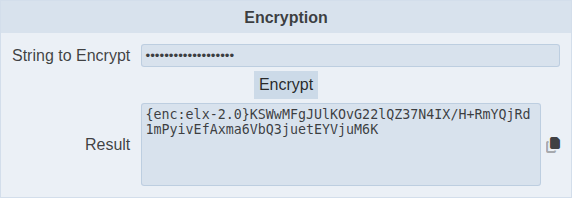
Copy the result and paste it into the configuration field that supports an encrypted value.
Copying the result
Click the copy icon next to the Result field to copy the encrypted value to your clipboard. A “Text copied” message confirms the copy was successful.
Note: Copying to the clipboard requires the page to be loaded over HTTPS. On a plain HTTP connection, click into the Result field, select all the text, and copy it manually.