This section will show the user the steps to rendering all the reports in a specified folder into the desired output format. PDF will be the chosen output format in this case.
-
In a repository or folder, right-click and select
AddandJob. Enter a unique name for the job. For instance, RenderAllReport, then clickFinish. The job will be created successfully. -
In
Designtab, right-click on the job, selectAdd, thenFileLoop. -
Right-click on
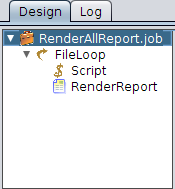
FileLoopand selectScript. Then, addRenderReport. The structure will be similar to Figure 5.1, “FileLoop Tree”. -
Click on FileLoop. In the
FileLooppanel, enter the folder directory in theFolder:field. User can also click on...to select the folder. CheckRecursiveif the files are contained within the folders of folders. -
In the
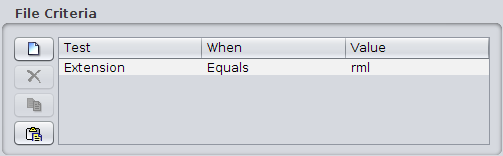
File Criteriapanel, add a new criteria. InTest, choose Extension in the dropdown list. ForWhencondition, select Equals. As forValue, enter rml like in Figure 5.2, “File Criteria”. -
In
Script, enter the following. This is to retain the directory structure:newFileName = FileName.replace(/.rml/g,".pdf");
-
In the
Render Reportjob, enter ${FileName} for theName:field in theReportpanel. This is so that the name of the PDF generated will take on the name of the rml file. -
For the
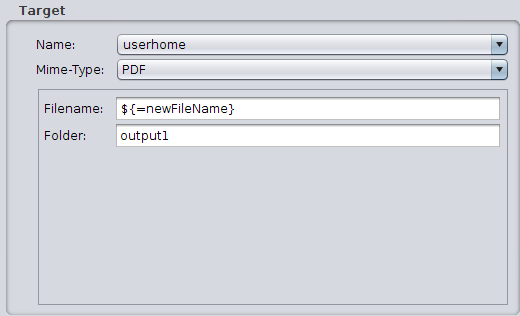
Targetpanel, selectuserhomeandPDFfor the output target name and output mime-type from the dropdown list respectively. For theFilename:field, enter ${=newFileName}. For theFolder:field, enter the desired folder name, for example output1, as seen in Figure 5.3, “Target Parameter”. -
If user wants to see the progress of file processed, user can click the
Logtab to view the log. - Now, run the job. After the job has finished running, the generated PDF files can be found in /User/{User_Name}/output1/.../, and the sub-folders will keep the same structure from the original folders which contain the reports.