
Deploy Licence
When the Repertoire is initially installed, it comes with a default licence. This default licence allows a minimal set of modules and does not have an expiration date. To access to other modules in Repertoire, a new licence needs to be imported into Repertoire. This new licence has an expiration date and need to be replaced before the expiry or Repertoire will fall back onto the minimal set of modules. There are two methods to deploy the licence, either by using the Repertoire interface or by using the Ambience command line interface. This method is useful during setup as you can install the licence before starting the server, hence avoiding the need to stop and restart. To deploy a licence using Repertoire interface:
-
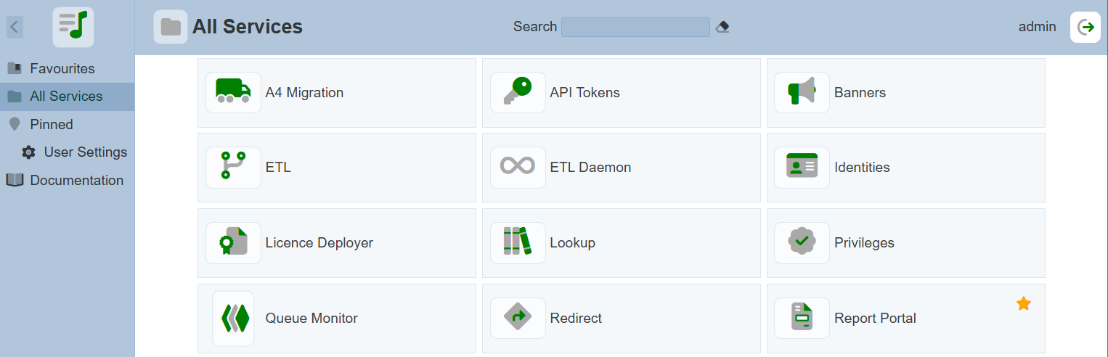
From the “Service Chooser” page, select the “Licence Deployer” in the right panel. If Ambience is initially installed and logged in for the first time, step 2 will appear directly.
-
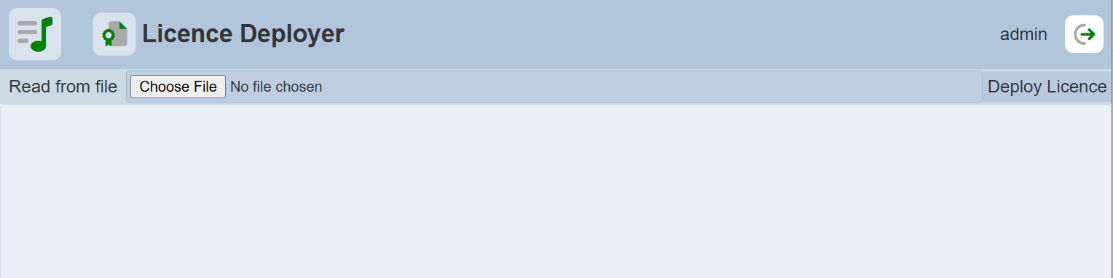
The “Licence Deployer” page will appear.
-
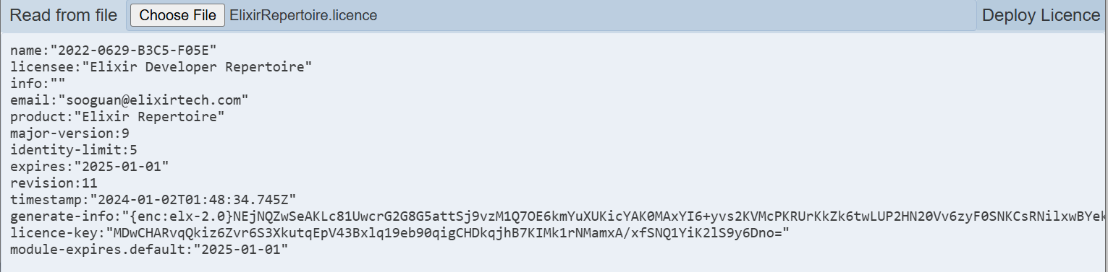
Click on the “Choose File” button and browse to the location of the licence file (*ElixirRepertoire.licence*). The content of the licence file will appear in the editor.
-
If the content is correct, click on the “Deploy Licence” button at the upper right corner of the page.
-
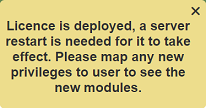
Upon successful upload, a message will appear.
-
After the licence has been deployed to the server. Restart the server for the licence to take effect.
-
Ensure to map any new privileges to the desired users to see the new modules.
To deploy a licence using Repertoire command line interface:
-
Open a terminal window and navigate to the Repertoire main folder, then navigate to the “bin” folder.
-
In the command line, key in the following command:
repertoire-cli deploy-licence <path of ElixirRepertoire.licence file> -
The command line window will display messages indicating the successful deployment.
